 PhotoTune
 Home / Headshot editor
Headshot editor for iPhone
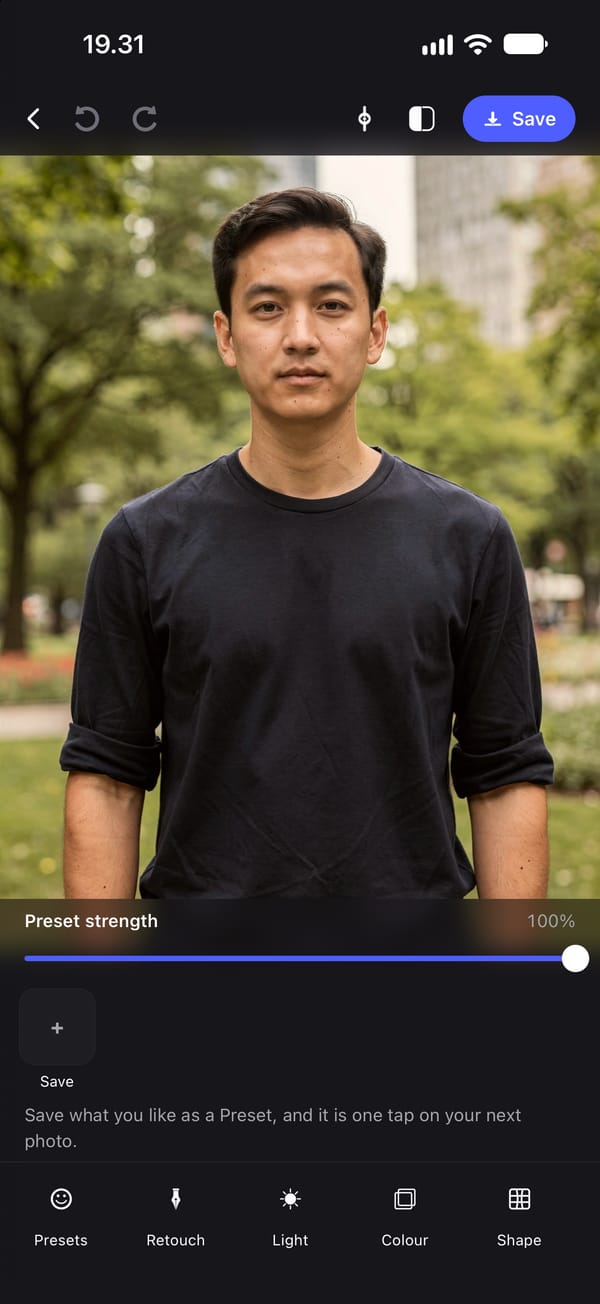
PhotoTune is a headshot editor for iPhone. Use it to clean up a LinkedIn photo, a team page portrait or any profile picture: even out skin, fix the lighting and clear a blemish without the photo looking retouched. Then save the edit and use the same one on your next headshot.
What a professional headshot edit needs
A profile photo has a narrow target. Too little editing and the lighting still looks like a phone snapshot. Too much and it reads as filtered, which on LinkedIn or a company page is worse than no editing at all, because the person meeting you later expects the face in the photo.
In practice a good headshot edit is short: soften the skin a little, clear anything temporary, brighten the face, make the teeth and eyes a little cleaner, and stop.
How to edit a headshot on iPhone
Skin softens small blotches and fine redness while putting fine skin detail back, so the result survives the close crop headshots are viewed at. Heal removes a spot with a tap. Lighting sets exposure and contrast, which fixes most indoor and overcast headshots on its own. Whiten lifts teeth and the whites of the eyes, with a cap on the eyes so they stay natural.
Filters adds a colour grade such as Clean, Bright, Portrait or Editorial, each with its own intensity, if you want a consistent look across a team.
Use the same edit on every profile photo
Save the finished settings as a Preset and the next headshot starts from exactly the same treatment, rather than being re-done by eye. This is what keeps a team page or a set of profile photos looking like one set.
A Preset holds the skin, whitening, lighting and colour settings, stored against the face rather than pixel positions, so it lands correctly on a different person, angle or crop. Healed spots are specific to one photo and are not carried over.
A headshot editor that does not change your face
There are no one-tap controls for jaw, nose, eyes or face width, and nothing automatic can change a shape. If a collar folded or a strand of hair is out of place, the manual Reshape brush moves only what you drag, and it is never saved into a Preset.
Need a new background or studio lighting?
Those are separate AI tools. Headshots relights a photo like a studio portrait on a plain background, Backdrop swaps the background for a studio, office, white or outdoor setting, and Clothes can change a top to a shirt, blazer or knit. They send that one photo to our editing service when you tap them. Everything on this page so far runs on your phone.
How to edit a headshot on iPhone
- 01
Open the headshot
Choose a front-facing photo with the face clearly visible, so face detection can place the skin and whitening tools.
- 02
Soften the skin
Use Skin to soften small blotches and fine redness, keeping enough Texture that the face still looks real at full size.
- 03
Fix the lighting
Raise Exposure for a dim face and add a little Contrast. Heal any temporary spot with a tap.
- 04
Save it as a Preset
Save the settings, then open the next headshot and tap the Preset to give it the same treatment.
FAQ
Headshot editor: common questions
Still have a question?
Anything not answered here — a device, a photo it struggled with, or how the trial works — reaches a person at this address.
Ask a questionHow do I make a phone photo look like a professional headshot?
Start with even, front-facing light and a plain background. Then even out skin, lift the exposure, clear temporary spots and lightly whiten teeth. For a studio look without a studio, the Headshots AI tool relights the photo on a plain background.
How much should you edit a LinkedIn photo?
Lightly. Fix lighting and temporary blemishes, but keep skin texture and leave your face shape alone, so you look like the photo when you meet people.
Can I apply the same edit to headshots of a whole team?
Yes. Save the edit as a Preset and apply it to each person's photo. It is stored against facial landmarks, so it works on different faces and angles.
Does editing a headshot send it to a server?
Not for skin, healing, whitening, lighting, colour or export, which run on the phone. Only the AI tools, such as Headshots, Backdrop and Clothes, send the photo, and only when you tap one.
Is it available on Android or the web?
No. PhotoTune is an iPhone app.
Related tools
- AI headshots
AI headshot generator from your own photo
Turn one photo into a professional headshot on iPhone: even studio lighting, a plain background, and your own pose, expression and face kept.
- Background changer
Change a photo background on iPhone
Change the background of a photo on iPhone to a studio wall, a blurred office, plain white or a warm outdoor scene. The person stays as they are.
- Natural retouch
Natural photo retouch for iPhone
A natural photo retouch app for iPhone. Smooth skin, clear blemishes and fix lighting while pores and skin texture stay. Retouching runs on your phone.
- Reusable edits
Save photo edits and apply them to other photos
Save photo edits as a Preset on iPhone and apply them to other photos in a tap, or to up to 100 at once. Skin, whitening, lighting and colour, reused across faces.